

The reason why I posed the above question today is because I’m seeing more and more Blogger-powered blogs that have such warnings reported by Chrome and Chrome happens to be my preferred internet browser of choice. The sight is disturbing but what is more disturbing is the fact that some bloggers didn’t pay much attention to such malware reports! What were they thinking?!
I can give you plenty of reasons why bloggers should pay serious attention to the existence of malicious software (malware) on their blogs but I will only list 3 today.
Malicious software (Malware) makes you lose traffic
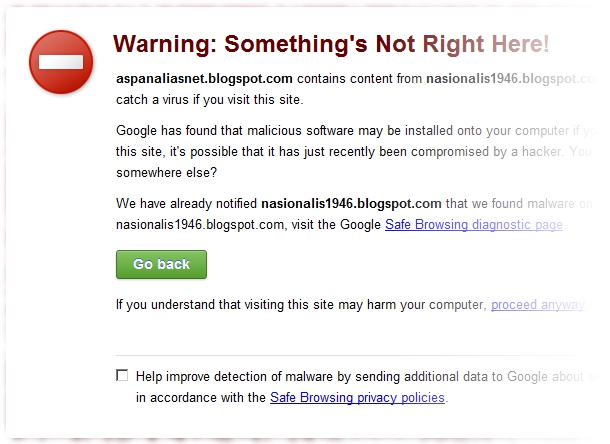
Take a good look at the following screenshot. Chrome clearly said that my computer may catch a virus if I visit a blog that is quite popular here in my part of the world. Chrome even provides me with a big ‘Go back’ button so that I can click on it and go back to the last safe zone. Just imagine how many potential visitors the 'infected' blog had lost!
Bad news travel fast!
Yes, bad news does travel very fast and soon people will be talking about the existence of malicious software (malware) on your blog. The news might end up on social networks and soon people might get scared to visit your blog. There goes your blog and your reputation as a blogger down the drain!
Malicious software (Malware) gives you distinct 'recognition', recognized by major search engines
Take a look at the following screenshot. Once you have malicious software (malware) on your blog, failure to remove it in a timely manner will be ‘punished’ severely by major search engines such as Google. Your blog will be labeled harmful and the label is clearly seen in search results pages (SERP). If you are searching for something via Google and stumbles upon search results with such warnings attached, would you go and visit that blog?

Alright! I have given you enough reasons and I hope you are now convinced that malicious software (malware) is not something that should be taken lightly. Now come and learn how to remove malicious software (malware) from your Blogger-powered blog in 5 minutes.
Yes, it is that easy!
How to remove malicious software (malware) from Blogger
Once you saw warnings such as the one shown earlier on Chrome, note down the ‘element’ identified as malicious. In this particular example, the malicious element originates from another blog (nasionalis1946.blogspot.com).

Go back to Chrome and visit your ‘infected’ blog. Quickly view the live page source of your blog and use Chrome’s ‘Find’ tool (hit Ctrl+F) to look for ‘nasionalis1946.blogspot.com’ in your live page source.
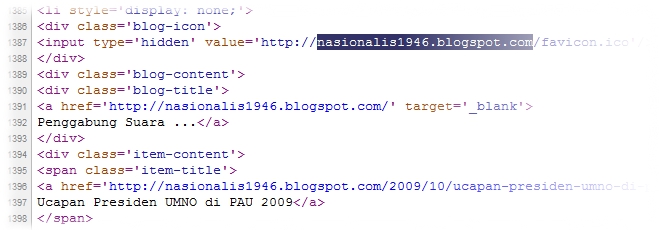
Once found, find out how it got there in the first place. See if it is coming from an installed widget or gadget. Based from past experience, most of the time it did came from one! In the example shown down below, the link to that malicious blog is generated after the blogger behind the ‘infected’ blog added it to his or her existing list of blogs in the Blog List gadget.

Thankfully, this is pretty easy to resolve. The blogger behind the ‘infected’ blog can simply edit his Blog List gadget from his or her Blogger Layout dashboard and remove the blog that is causing the ‘infection’ from the list. Everything should be fine after the removal has been made and the new list saved back to Blogger!
There you are! Nasty malware removal for Blogger in just 5 minutes! :)


 There has not been a direct service from any of the popular email
services for getting a SMS alert for receiving a new email in your
inbox. Well here is a trick to do just that !!.The trick allows you to
get free SMS alerts for any mobile network in india , as soon as you
receive a new email in your email inbox and for free.
There has not been a direct service from any of the popular email
services for getting a SMS alert for receiving a new email in your
inbox. Well here is a trick to do just that !!.The trick allows you to
get free SMS alerts for any mobile network in india , as soon as you
receive a new email in your email inbox and for free.


